I can't believe how fast July went by...I had two friends who got new computers and I enjoyed helping them set them up and transferring the info from their old computers....Then my main computer died. I purchased the computer at Costco and it came with a 2 year Costco warranty, which was about to expire on August 28 of this month. The computer was on 8-10 hours a day for almost two years. I telephoned the Costco service department and they were great helping me get my computer fixed...I packed it up and sent it to the Gateway service center in Texas.. and it was back here within 10 days.. It needed a new hard drive..Thank goodness all my data was backed up on external hard drives.. I have spent the last week adding programs and information back into the computer..I only have a few more programs to install......when I am done I am going to make a backup copy of my whole hard drive, including the operating system, so I won't have to do this again..
I did have one successful photo adventure this month... I woke up one morning and it was foggy..I have wanted to take the following photograph in the fog..so out the door I went with two cameras and a cup of coffee in my hand... it was worth it... here is the original photograph:
I cropped it and then flipped it horizontally so the brightness would be on the left side... Then some Photoshop, Topaz adjust and Topaz simplify. I am very happy with the end result..(Click to see larger.)
See you next month.
Information on what I am doing and some information on digital photography technique.
Wednesday, August 31, 2011
Sunday, July 31, 2011
A Pretty framing effect
I found an article on how to use a rose as a background frame for its own photograph..Here are my first attempts:
Picture of the empty creek with nice grass
I was taking a walk and thought this picture of the empty creek would be a good photograph to add a bobcat in the forground..I found a bobcat in my files and put him in the picture..looks real to me..Fun
Friday, July 29, 2011
Another example of the below technique for painting in Painter Essentials 4
The little guy in the outdoor portrait below has grown up...His name is Andre. Here is his original senior portrait with a very distracting background..(click to enlarge)
After working in Photoshop Topaz Adjust plug-in, I opened the portrait in Painter Essentials 4 and used the "Sargent" and "Just Add Water" brushes for this portrait...then I vignetted it and framed it in Photoshop..I am really happy with the way it turned out..He will really appreciate it when he is my age, if he is lucky enough to live that long..(click to see a larger image)
Sometimes ideas come from suprising places
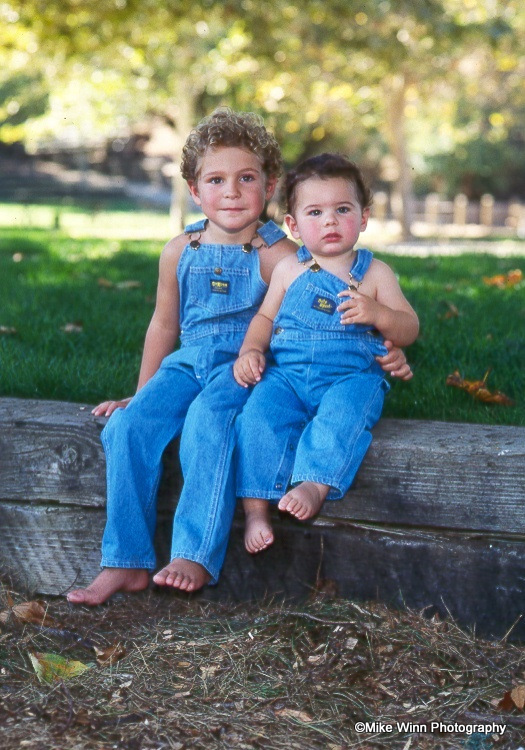
Yesterday I got an email newsletter from Topaz about how a painter uses "Topaz Adjust" to help prepare his photographs for painting in " Painter 11."...it was a good article and I got a couple of ideas I wanted to try on my photographic paintings...I dug through my files and found this photograph I took of two of my grandsons in the early 90's in the park.. Here is the original: (Click to enlarge)
I spent about 3 hours working on the image..first in Photoshop and then in Corel Painter Essentials 4..using the "Sargent brush", "just add water" brush, and the" soft edge cloner,".. I am very happy with the result as I feel it looks like a painting and would look good printed on a canvas..
Here is the finished portrait. (Click to enlarge)
I spent about 3 hours working on the image..first in Photoshop and then in Corel Painter Essentials 4..using the "Sargent brush", "just add water" brush, and the" soft edge cloner,".. I am very happy with the result as I feel it looks like a painting and would look good printed on a canvas..
Here is the finished portrait. (Click to enlarge)
Subscribe to:
Posts (Atom)